 |
LootLocker Unreal SDK 10.6.0
Game backend SDK for Unreal Engine
|
|
LootLocker Unreal SDK 10.6.0
Game backend SDK for Unreal Engine
|
#include <LootLockerRemoteSessionRequestHandler.h>
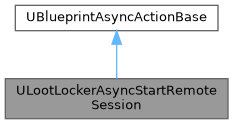
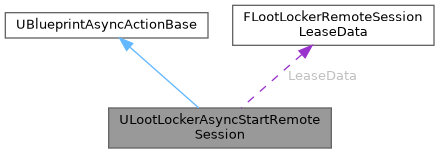
Public Member Functions | |
| virtual void | Activate () override |
| Execute the actual operation. | |
Static Public Member Functions | |
| static ULootLockerAsyncStartRemoteSession * | AsyncStartRemoteSession (UObject *WorldContextObjectfloat, float PollingIntervalSeconds, float TimeOutAfterMinutes, ELootLockerAccountProvider Provider=ELootLockerAccountProvider::Guest) |
| Start a remote session If you want to let your local user sign in using another device then you use this method. | |
| static ULootLockerAsyncStartRemoteSession * | AsyncStartRemoteSessionForLinking (UObject *WorldContextObject, FString ForPlayerWithUlid, float PollingIntervalSeconds, float TimeOutAfterMinutes, ELootLockerAccountProvider Provider=ELootLockerAccountProvider::Guest) |
| Start a remote session with the intent to use the remote session for connecting accounts If you want to let your local user sign in using another device then you use this method. | |
Data Fields | |
| FLootLockerAsyncRemoteSessionMulticastDelegate | OnProcessStarted |
| Triggered once the lease process has successfully been started and the LeaseData property has been populated with the necessary information. | |
| FLootLockerAsyncRemoteSessionMulticastDelegate | OnLeaseClaimed |
| Triggered once the remote lease has been claimed (external process) | |
| FLootLockerAsyncRemoteSessionMulticastDelegate | OnLeaseVerified |
| Triggered once the remote lease has been verified (external process) | |
| FLootLockerAsyncRemoteSessionMulticastDelegate | OnProcessCancelled |
| Triggered if the process was canceled using the CancelRemoteSessionProcess method. | |
| FLootLockerAsyncRemoteSessionMulticastDelegate | OnProcessTimedOut |
| Triggered if the process times out. | |
| FLootLockerAsyncRemoteSessionMulticastDelegate | OnProcessFailed |
| Triggered if the process has concluded and was not a success. | |
| FLootLockerAsyncRemoteSessionMulticastDelegate | OnProcessFinished |
| Triggered if the process concluded successfully. | |
Protected Member Functions | |
| virtual void | HandleLeaseProcessStarted (const FLootLockerLeaseRemoteSessionResponse &LeaseProcessStartedResponse) |
| virtual void | HandleLeaseProcessUpdate (const FLootLockerRemoteSessionStatusPollingResponse &LeaseProcessUpdateResponse) |
| virtual void | HandleLeaseProcessCompleted (const FLootLockerStartRemoteSessionResponse &LeaseProcessCompletedResponse) |
Protected Attributes | |
| FString | ForPlayerWithUlid = "" |
| ELootLockerRemoteSessionLeaseIntent | Intent = ELootLockerRemoteSessionLeaseIntent::login |
| ELootLockerAccountProvider | Provider = ELootLockerAccountProvider::Guest |
| FString | LeaseProcessID = "" |
| float | PollingIntervalInSeconds = 0.0f |
| float | TimeoutAfterMinutes = 0.0f |
| FLootLockerRemoteSessionLeaseData | LeaseData |
|
overridevirtual |
Execute the actual operation.
|
static |
Start a remote session If you want to let your local user sign in using another device then you use this method.
First you will get the lease information (the LeaseData property will be populated) needed to allow a secondary device to authenticate and the OnProcessStarted event will trigger.
Once the lease process status changes, the corresponding event will be triggered.
When the process has come to an end successfully, the OnProcessFinished event will trigger and the SessionTokenOnSuccess, RefreshTokenOnSuccess, and PlayerDataOnSuccess properties will be populated if present in the response.
If the process is cancelled by the user, the OnProcessCanceled event will trigger.
If the process times out, the OnProcessTimedOut event will trigger.
If the process fails, the OnProcessFailed event will trigger and the ResponseOnFailure property will be populated and contain error data.
| WorldContextObject | Non input: Automatic context for async node |
| PollingIntervalSeconds | Optional: How often to poll the status of the remote session process |
| TimeOutAfterMinutes | Optional: How long to allow the process to take in its entirety |
| Provider | Optional: Preloads the connection flow with which account provider to use for linking, so the user does not have to select it manually. Leave as Guest to let the user choose. |
|
static |
Start a remote session with the intent to use the remote session for connecting accounts If you want to let your local user sign in using another device then you use this method.
First you will get the lease information (the LeaseData property will be populated) needed to allow a secondary device to authenticate and the OnProcessStarted event will trigger.
Once the lease process status changes, the corresponding event will be triggered.
When the process has come to an end successfully, the OnProcessFinished event will trigger and the SessionTokenOnSuccess, RefreshTokenOnSuccess, and PlayerDataOnSuccess properties will be populated if present in the response.
If the process is cancelled by the user, the OnProcessCanceled event will trigger.
If the process times out, the OnProcessTimedOut event will trigger.
If the process fails, the OnProcessFailed event will trigger and the ResponseOnFailure property will be populated and contain error data.
| WorldContextObject | Non input: Automatic context for async node |
| ForPlayerWithUlid | Execute the request for the specified player (the player that you intend to link the remote account into). |
| PollingIntervalSeconds | Optional: How often to poll the status of the remote session process |
| TimeOutAfterMinutes | Optional: How long to allow the process to take in its entirety |
| Provider | Optional: Preloads the connection flow with which account provider to use for linking, so the user does not have to select it manually. Leave as Guest to let the user choose. |
|
protectedvirtual |
|
protectedvirtual |
|
protectedvirtual |
|
protected |
|
protected |
|
protected |
|
protected |
| FLootLockerAsyncRemoteSessionMulticastDelegate ULootLockerAsyncStartRemoteSession::OnLeaseClaimed |
Triggered once the remote lease has been claimed (external process)
| FLootLockerAsyncRemoteSessionMulticastDelegate ULootLockerAsyncStartRemoteSession::OnLeaseVerified |
Triggered once the remote lease has been verified (external process)
| FLootLockerAsyncRemoteSessionMulticastDelegate ULootLockerAsyncStartRemoteSession::OnProcessCancelled |
Triggered if the process was canceled using the CancelRemoteSessionProcess method.
| FLootLockerAsyncRemoteSessionMulticastDelegate ULootLockerAsyncStartRemoteSession::OnProcessFailed |
Triggered if the process has concluded and was not a success.
The ResponseOnFailure will be populated with the relevant error information
| FLootLockerAsyncRemoteSessionMulticastDelegate ULootLockerAsyncStartRemoteSession::OnProcessFinished |
Triggered if the process concluded successfully.
The SessionTokenOnSuccess, RefreshTokenOnSuccess, and PlayerDataOnSuccess properties will be populated (if present in the response).
| FLootLockerAsyncRemoteSessionMulticastDelegate ULootLockerAsyncStartRemoteSession::OnProcessStarted |
Triggered once the lease process has successfully been started and the LeaseData property has been populated with the necessary information.
| FLootLockerAsyncRemoteSessionMulticastDelegate ULootLockerAsyncStartRemoteSession::OnProcessTimedOut |
Triggered if the process times out.
|
protected |
|
protected |
|
protected |